
When someone opens a PR in a WordPress plugin, the usual process for reviewing it involves downloading the branch, installing it locally, activating the plugin, and testing the changes by hand. That has frictions: you have to have a prepared local environment and dedicate time to install something that is perhaps half broken. If the reviewer is not a developer, they can’t do it directly.
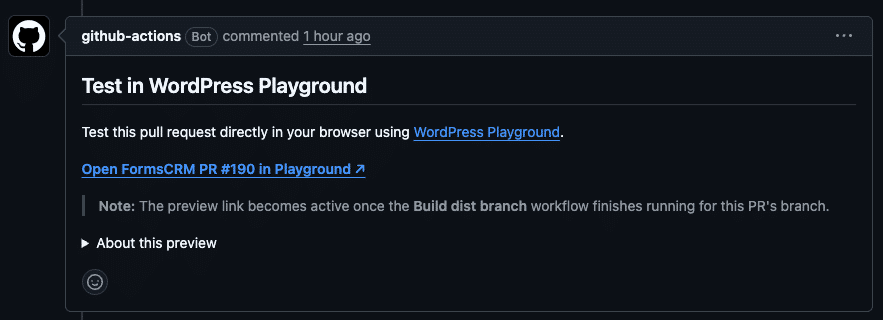
With this setup, the PR itself generates a link that opens the plugin running in the browser. One click, and you’re already trying.
Tabla de contenidos
What is WordPress Playground?
WordPress Playground is a WordPress environment that runs entirely in-browser, serverless. Use WebAssembly (WASM) to run PHP directly on the client. You don’t need Docker, XAMPP, or anything installed locally.
Anyone can open a URL and have a functional WordPress in seconds, with the plugin installed and activated. When you close the tab, everything disappears. No trace, no facilities, no conflicts.
This makes it perfect for code reviews, quick demos, and plugin testing without compromising any real environment.
How the complete system works
There are three pieces that fit together:
- build-dist.yml — runs on every push. It installs the Composer dependencies without
--dev, generates ablueprint.jsonpointing to that particular branch, and forces a push to a branchdist/nombre-rama. It also deletes the dist branch when the original is deleted. - playground-preview.yml — Runs when a PR is opened, reopened, or updated. Build the Playground URL with the dist branch blueprint and post or update a comment in the PR. Use HTML marker so you don’t duplicate comments.
- pr-blueprint.json — blueprint template to check the trunk manually, without opening a PR. Define the landing page within wp-admin, automatically log in as admin, install the plugin from the zip URL and activate it.
Step-by-step guide
1. Create the folder structure
You need two folders at the root of the repository: .github/workflows/ for workflows and .github/ for the blueprint.
2. Add build-dist.yml
This workflow does three things: it installs dependencies, generates the blueprint with the correct branch, and pushes the dist branch. Adjust the landingPage plugin and plugin name in the blueprint generation section.
name: Build dist branch

on:
  push:
    branches:
      - '**'
  delete:

permissions:
  contents: write

jobs:
  build:
    if: github.event_name == 'push' && !startsWith(github.ref_name, 'dist/')
    runs-on: ubuntu-latest
    steps:
      - name: Checkout
        uses: actions/checkout@v4

      - name: Setup PHP
        uses: shivammathur/setup-php@v2
        with:
          php-version: '8.2'
          tools: composer

      - name: Install production dependencies
        run: composer install --no-dev --optimize-autoloader

      - name: Generate Playground blueprint
        env:
          BRANCH_NAME: ${{ github.ref_name }}
        run: |
          mkdir -p .wordpress-playground
          cat > .github/pr-blueprint.json << EOF
          {
            "\$schema": "https://playground.wordpress.net/blueprint-schema.json",
            "landingPage": "/wp-admin/options-general.php?page=your-plugin",
            "steps": [
              {
                "step": "login",
                "username": "admin",
                "password": "password"
              },
              {
                "step": "installPlugin",
                "pluginZipFile": {
                  "resource": "url",
                  "url": "https://github.com/your-org/your-plugin/archive/refs/heads/dist/${BRANCH_NAME}.zip"
                },
                "options": { "activate": true }
              }
            ]
          }
          EOF

      - name: Push to dist branch
        env:
          BRANCH_NAME: ${{ github.ref_name }}
        run: |
          git config user.name "github-actions[bot]"
          git config user.email "github-actions[bot]@users.noreply.github.com"
          git add -f vendor/ .wordpress-playground/
          git diff --cached --quiet || git commit -m "Build: add vendor and playground blueprint"
          git push origin HEAD:dist/${BRANCH_NAME} --force

  delete-dist:
    if: github.event_name == 'delete' && github.event.ref_type == 'branch' && !startsWith(github.event.ref, 'dist/')
    runs-on: ubuntu-latest
    steps:
      - name: Checkout
        uses: actions/checkout@v4

      - name: Delete dist branch
        env:
          BRANCH_NAME: ${{ github.event.ref }}
        run: |
          git push origin ":refs/heads/dist/${BRANCH_NAME}" || true
3. Add playground-preview.yml
This workflow publishes the comment to the PR. HTML markup prevents duplicate comments from being created on each push. Change it to the name of your plugin.
name: Playground PR Preview

on:
  pull_request:
    types: [opened, reopened, synchronize]

permissions:
  issues: write
  pull-requests: write

jobs:
  playground-preview:
    name: Comment with Playground preview link
    runs-on: ubuntu-latest
    steps:
      - name: Post Playground preview comment
        uses: actions/github-script@v7
        with:
          github-token: ${{ secrets.GITHUB_TOKEN }}
          script: |
            const marker = '<!-- your-plugin-playground-preview -->';
            const issue_number = context.payload.pull_request.number;
            const branchName = context.payload.pull_request.head.ref;
            const owner = context.repo.owner;
            const repo = context.repo.repo;

            const blueprintUrl = `https://raw.githubusercontent.com/${owner}/${repo}/dist/${branchName}/.wordpress-playground/blueprint.json`;
            const playgroundUrl = `https://playground.wordpress.net/?blueprint-url=${encodeURIComponent(blueprintUrl)}`;

            const body = [
              marker,
              '## Test in WordPress Playground',
              `[**Open PR #${issue_number} in Playground ↗**](${playgroundUrl})`,
              '> The link becomes active once the **Build dist branch** workflow finishes.',
              '- Login: `admin` / `password`',
              '- The plugin is installed and activated automatically.',
            ].join('\n');

            const comments = await github.paginate(
              github.rest.issues.listComments,
              { owner, repo, issue_number, per_page: 100 }
            );
            const existing = comments.find(c => c.body?.includes(marker));

            if (existing) {
              await github.rest.issues.updateComment({ owner, repo, comment_id: existing.id, body });
            } else {
              await github.rest.issues.createComment({ owner, repo, issue_number, body });
            }
4. Check workflow permissions
In build-dist.yml Coming permissions: contents: write. In playground-preview.yml you need issues: write and pull-requests: write. If your repo has the Actions with restricted permissions by default, review it in Settings → Actions → General → Workflow permissions.
5. Make the first push and check
Push any branch, go to Actions , and check that the Build dist branch workflow ends in green. On the repo branches it should appear dist/nombre-de-tu-rama with the vendor and blueprint inside.
6. Open a PR and wait for the automatic comment
Opening the PR executes the Playground PR Preview workflow. In a few seconds you will see a comment with the direct link to Playground with the plugin installed, login made as admin and the settings page open.
Customize the blueprint
The blueprint is a JSON that Playground interprets. You can add more steps depending on what your plugin needs.
Install a dependency plugin
{
  "step": "installPlugin",
  "pluginZipFile": {
    "resource": "wordpress.org/plugins",
    "slug": "woocommerce"
  },
  "options": { "activate": true }
}
Create Test Data with WP-CLI
{
  "step": "wp-cli",
  "command": "wp post create --post_title='Test product' --post_status=publish"
}
Fix WordPress or PHP version
{
  "$schema": "https://playground.wordpress.net/blueprint-schema.json",
  "preferredVersions": {
    "php": "8.1",
    "wp": "6.4"
  }
}
Important Notes
The Composer vendor registers in the dist branch with git add -f vendor/. It’s intentional: Playground downloads the zip from that branch and needs all the dependencies included. It doesn’t conflict with you .gitignore because it only happens in the dist branch.
The build is forced (--force), so the dist branch always reflects the current state. There is no accumulated history.
If a PR receives several pushes in a row, the workflow updates the same comment instead of creating a new one. That is controlled by the HTML marker. Change it to something unique to your plugin to avoid collisions if you have multiple repos with the same setup.
Full documentation: WordPress Playground Guide
